Turn screenshots into 3D mockups and product shots
Project Camera is a free mockup generator that runs in your browser: point a real 3D camera at a screenshot or product photo, add depth blur, a shadow and a background, and export a PNG up to 4K.
- Free
- No upload
- No watermark
- Up to 4K
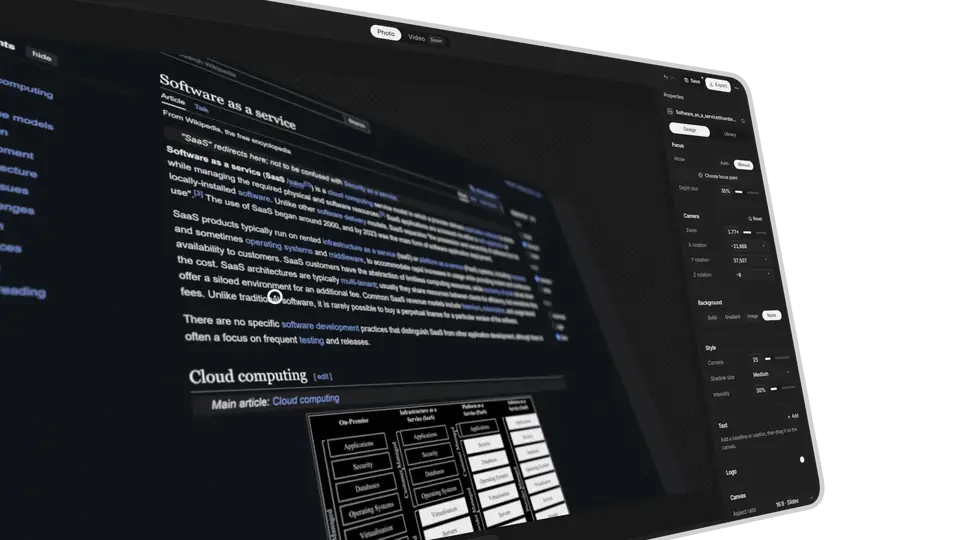
3D camera · depth blur · transparent PNG
Made for a big screen. The studio needs a mouse and a keyboard. Open this page on your computer to start editing.
01 / features
Everything a product shot needs
3D camera
Zoom, rotate and tilt your image in true perspective. Widen or narrow the field of view.
Depth blur
Set the focus point by hand or automatically, and choose how softly the rest falls away.
Backgrounds and style
A color, a gradient, an image or nothing at all. Rounded corners, a stroke, a soft shadow.
Text and logos
Place a headline, a caption or your logo on the canvas.
Every format
Slides, posts or stories: 16:9, 3:2, 4:3, 1:1, 4:5, 9:16 or 21:9.
Export up to 4K
PNG at HD, 2K, 4K or a custom size, with a transparent background if you need one.
Projects
Save your work in the browser, or take it to another computer as a project file.
02 / how it works
How to make a 3D screenshot mockup
Add your image
Drop a screenshot or photo onto the page, paste it from the clipboard, or upload a PNG, JPG, WebP, AVIF, GIF or SVG file.
Frame the shot
Hold Ctrl or ⌘ and drag to rotate the camera, scroll to zoom. Pick a focus point, set the blur, style the background.
Export a PNG
Choose HD, 2K, 4K or a custom size and download. Save the project to keep editing later.
03 / privacy
Your images stay on your device
Project Camera runs entirely in your browser. Images and projects are never uploaded, every export is rendered on your own computer, and there is no account and no watermark.
04 / faq
Frequently asked questions
Is Project Camera free?
Yes. There is no account, no subscription and no watermark. Project Camera is open source under the GNU General Public License v3.
Are my images uploaded to a server?
No. Everything happens in your browser and your images never leave your device. Projects are saved in your browser's storage, so clearing site data deletes them. Export a project file to keep a backup.
Which file types can I use?
You can import PNG, JPG, WebP, AVIF, GIF and SVG images.
How large can I export?
PNG files at HD (1920 px), 2K (2560 px), 4K (3840 px) or a custom size, with or without a transparent background.
Does it work on a phone or tablet?
The studio is built for a computer with a mouse and keyboard. It works best in a current version of Chrome, Edge or Safari, and its 3D perspective and depth blur need WebGL.